Using the Google Maps API in China – Problem and Solution
Did you know that the Google Maps API does not work in China? We had to solve this problem on one of our projects. Here is how STUDIO-JT solved it.

The Problem
The Google Maps API does not work properly in China. This is because the maps.google.com domain, which is normally used to display Google Maps, is blocked in China.
But don’t worry! Google already knows about this issue and provides a solution.
The Solution
If you replace google.com, Google’s default API domain, with google.cn, you can use Google Maps in China as well. This domain runs on Google’s servers in China and uses http.
Example:
https://maps.google.com/maps/api/js?region=KR
Solution
http://maps.google.cn/maps/api/js?region=KR
When using Google Maps, don’t forget to set the region parameter to KR if you want Dokdo and the East Sea to be displayed!!!
Update 2018.08.11: On the demo page, calls to Google Maps China are currently being blocked because of a compatibility issue with SSL, which causes the browser to treat it as an insecure script. We will update this post as soon as we confirm the issue.
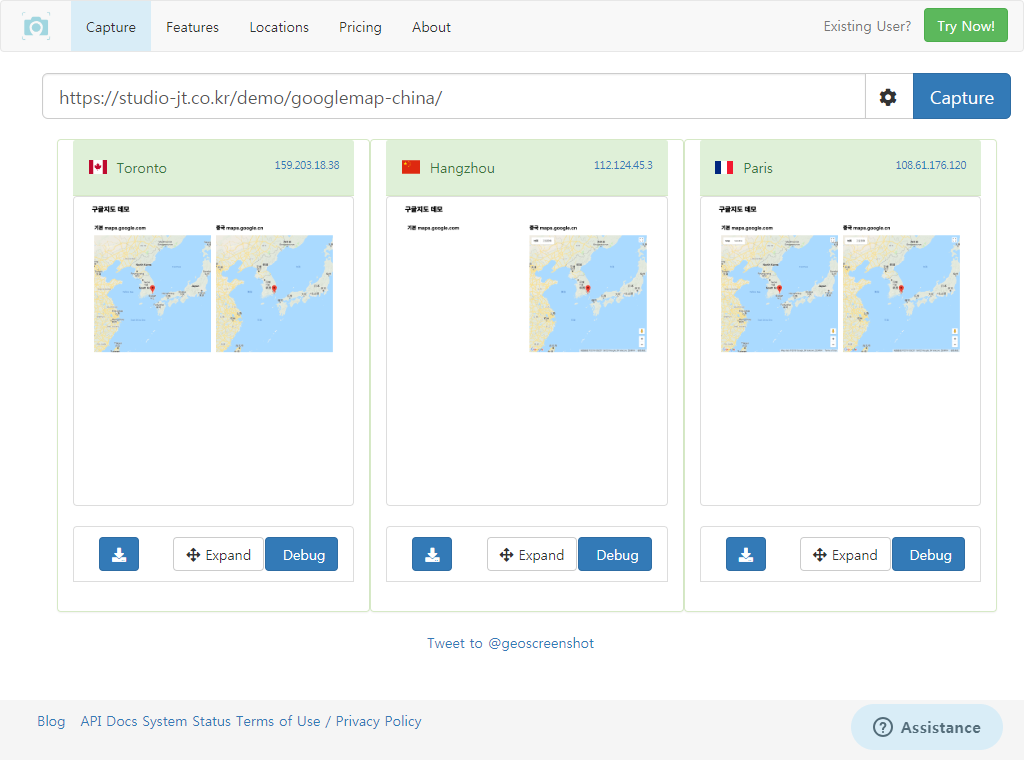
If you visit the demo page from a country other than China, both maps display normally. If you visit it from China, only the map on the right is displayed. (See below for how to test a page remotely from a server in China.)
Optimizing the Code
Requesting Google Maps from Chinese servers is slow from countries outside China, so it is best to optimize your code so that only users in China use google.cn.
You can use a PHP library such as the maxmind geoip php api to serve a different Google Maps domain based on the user’s IP.
If you can’t use a geoip library, another option is to check the user’s browser language and serve the China Google Maps API only when it is Chinese.
(You could also use the HTML5 geolocation API, but we don’t recommend it because it asks the user for permission.)
PHP example:
[php]
$lang = substr($_SERVER[‘HTTP_ACCEPT_LANGUAGE’], 0, 2);
if($lang === ‘zh’){
$google_map_url = ‘http://maps.google.cn/maps/api/js?region=KR’;
}else{
$google_map_url = ‘https://maps.google.com/maps/api/js?region=KR’;
}
echo ‘<script src="’.$google_map_url.’"><script>’;
[/php]
JavaScript example:
If you use JavaScript, you need to load the script asynchronously.
jQuery reference used in the example: $.getScript
[js]
var google_map_url = ”;
var lang = navigator.language || navigator.userLanguage;
if(lang === ‘zh’){
google_map_url = ‘http://maps.google.cn/maps/api/js?region=KR’;
}else{
google_map_url = ‘https://maps.google.com/maps/api/js?region=KR’;
}
$.getScript( google_map_url ).done(function( script, textStatus ) {
// Build your Google Map here
}
[/js]
Testing Google Maps
Finally, you need to check from a computer environment in China that Google Maps connects properly.
The simplest way is to use a service like webpagetest.org.
This service provides screenshots showing how a website looks from a server in China.
Go to https://www.webpagetest.org, select “Yangzhou, China (Chrome,Firefox)” as the location, and run the test.
When the test is complete and the results page appears, click “Screenshot” to see how your website looks in China. (It may take a while depending on how many people are in the queue.)
Update: webpagetest.org has announced that it no longer offers a location in China. At JT, we found a new way to test websites from a server in China. With the geoscreenshot.com/country/china service, you can see how your website looks in China.
Reference Links
Google offical FAQ : https://developers.google.com/maps/faq#china_ws_access
Notes
The demo page and sample code do not include a Google API key, but we strongly recommend adding a Google API key to prevent problems that may occur in production.
May.2017By Studio JT