Schema Markup | A Beginner’s Guide to Standing Out in Search Results (SERP)
How to use schema markup to raise CTR, with real-world examples.
What Is Schema Markup?
Schema markup is a markup language that helps search engines understand and analyze the content of a website. It adds structured data to web pages so search engines can understand the information better.
A schema is a way of organizing and defining data that is related to each other.
Google, Microsoft, Yahoo and Yandex defined a common schema that all four search engines can use, through Schema.org.
Schema markup is used to provide richer, more useful information in search results. For example, if you add the product name, price and stock status to a product page with schema markup, more of that information can appear in search results. This helps users understand the results better and find what they want faster.
Schema markup is usually written in JSON-LD format and inserted into the attributes of HTML elements to add structured data. This helps search engines analyze and recognize the content of a web page.
When search engines collect information, they see the content inside HTML tags only as text and cannot tell what kind of data it represents. If you write markup with the right schema, you can give search engines more accurate information. The better a search engine understands a page, the more likely the site is to appear in results. In fact, Google has reported that sites using schema markup get a 25% higher click-through rate.
Why Does Schema Markup Matter?
Google uses the Google Knowledge Graph to show users relevant results even when they don’t search for a specific word. Schema markup is an important source of Knowledge Graph data and affects many search engine results page (SERP) features, such as Rich Answers and Rich Snippets.
A Rich Snippet is extra information shown alongside the summary text (snippet) on a search results page. Search engines generate it automatically by collecting structured data written with schema in the HTML.
Common schema types include Product, Review, FAQ and HowTo. For commercial sites, using the Product type can show information such as price and star rating right on the results page, so users get it without even clicking through to the website.
Below is an example of a search results page before and after using HowTo schema markup.
The fact that the integration takes 10 steps, and the title of each step, can be shown as a rich snippet.
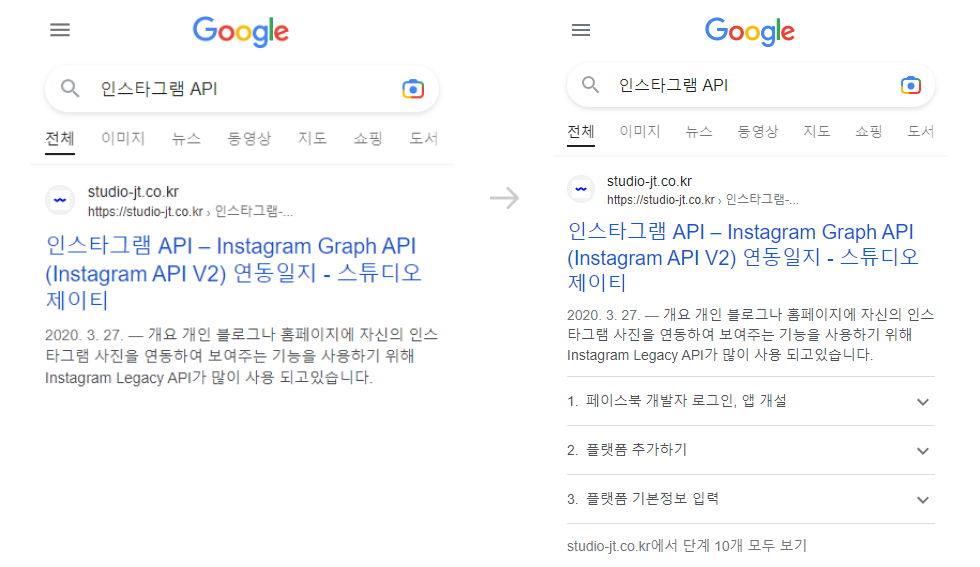
Using schema markup does not guarantee a rich snippet. But even without one, a website that search engines understand well is more likely to be shown to the right users, which is a great branding opportunity. That is why using schema markup matters.
How Do You Use It?
Write the markup in one of three formats, JSON-LD, Microdata or RDFa, and add it to your HTML. You can find a suitable schema type in the official schema documentation and customize it by hand, or use a generator.
1. JSON-LD
Here is an example of HowTo schema markup written in JSON-LD.
It is declared all at once inside a script tag and can be used semi-automatically, which makes it the most widely recommended format.
<script type="application/ld+json" class="saswp-custom-schema-markup-output">
    {
    "@context": "https://schema.org",
    "@type": "HowTo",
    "name": "Instagram API – Instagram Graph API (Instagram API V2) Integration Log",
    "image": {
      "@type": "ImageObject",
      "url": "url",
      "height": "400",
      "width": "400"
    },
    "step": [
      {
        "@type": "HowToStep",
        "url": "url",
        "name": "Log in to Facebook for Developers and create an app",
        "itemListElement": [{
          "@type": "HowToDirection",
          "text": "Go to the Facebook developer center, log in, and click the 'My Apps – Create App' button."
        }, {
          "@type": "HowToDirection",
          "text": "Enter the app's basic information, then click the 'Create App ID' button to create the app."
        }]
      }, ]
    }
</script>
2. Microdata
Here is an example of HowTo schema markup written in Microdata.
It relies on inline tags, so it cannot be automated, and it is relatively more complex than JSON-LD.
<div itemscope itemtype="https://schema.org/HowTo">
    <div itemprop="name">Instagram API – Instagram Graph API (Instagram API V2) Integration Log</div>
    <div itemprop="step" itemscope itemtype="https://schema.org/HowToStep">
        <div itemprop="url">url</div>
        <div itemprop="name">Log in to Facebook for Developers and create an app</div>
        <div itemprop="itemListElement" itemtype="https://schema.org/HowToDirection">
            <div itemprop="text">Enter the app's basic information, then click the 'Create App ID' button to create the app</div>
        </div>
    </div>
</div>
3. RDFa
Here is an example of HowTo schema markup written in RDFa.
Like Microdata, it relies on inline tags.
<div vocab="https://schema.org/" typeof="HowTo">
    <div property="name">Instagram API – Instagram Graph API (Instagram API V2) Integration Log</div>
    <div property="step" typeof="HowToStep">
        <div property="url">url</div>
        <div property="name">Log in to Facebook for Developers and create an app</div>
        <div property="itemListElement" typeof="HowToDirection">
            <div property="text">Enter the app's basic information, then click the 'Create App ID' button to create the app</div>
        </div>
    </div>
</div>
How Do You Check It?
Structured data that violates the guidelines may not appear as a rich snippet, or may be flagged as spam.
So check that you used valid properties and test whether the rich snippet shows up the way you want.
You can run the tests at the links below.
- Check for schema errors: https://validator.schema.org
- Check rich snippet results: https://search.google.com/test/rich-results?hl=ko
* Note: After the website goes live, check the status reports in Google Search Console.
* Reference: Google’s structured data guidelines
Related Terms (SEO/GEO Glossary)
For detailed definitions of the terms in this post, see the STUDIO-JT SEO/GEO Glossary.
Feb.2023By Studio JT