Google AMP (Accelerated Mobile Pages)
Google built AMP with loading speed as its only focus and released it as open source. Here is what you need to know about AMP.
The situation
Many times a day, we open mobile pages on the smartphones in our hands. Yet even with a strong Wi-Fi or data connection, pages load in fits and starts, testing our patience. Eventually we hit our limit, press the back button hard, and move on to another page.
If a mobile page you visited for a specific purpose loads slowly, would you stay? If you are on mobile data, would you open a page that uses a lot of it?
So Google built one. AMP! (Reference: amp.dev )
AMP (Accelerated Mobile Pages)
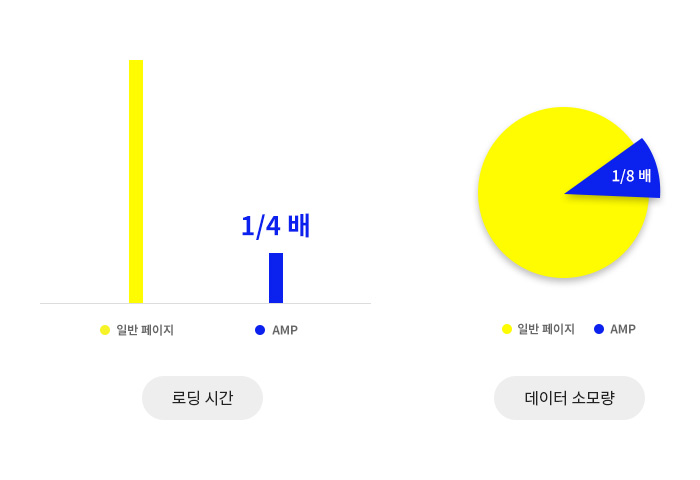
AMP is an open-source library released by Google in October 2015. What Google emphasized most when releasing AMP was faster loading: it is said to be up to 4 times faster than regular mobile pages and to use as little as 1/8 of the data.
So far, the vendors, partners, and supported platforms registered on amp.dev include 131 for Ads, 51 for Analytics, 16 Content Platforms, 15 CMSs, and 18 for Audio/Video, for a total of 231 vendors and companies. Recently, the Korean e-commerce platform Cafe24 also announced that it adopted AMP in April 2019.
So why are so many vendors and companies adopting AMP?
Loading time and bounce rate
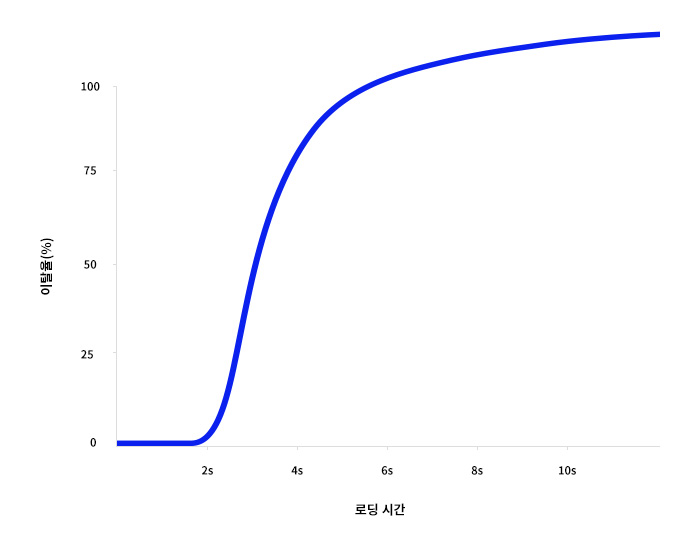
When a mobile page takes more than 3 seconds to load, 32% of visitors leave before it finishes loading. Over 5 seconds, it’s 90%; from 6 seconds, 106%; and over 10 seconds, 123% of visitors bounce. And the next destination for visitors who left because of long loading times will naturally be a competitor’s page.
By first making their mobile pages load faster, companies can bring in visitors, increase time on site, and make a profit.
- Less loading time and data usage for mobile pages.
- Lower bounce rate among page visitors.
- Longer time on page for visitors.
- Visitors get the information they need.
- Companies make a profit.
Three components
AMP runs on three components: AMP HTML, AMP JS, and AMP Cache. ( Reference: amp.dev )
AMP HTML is a kind of HTML extension that excludes elements that slow down regular HTML documents and adds some extended attributes. You write HTML following the basic and required markup, using specific tags defined by Google. For example, instead of the <img> tag you use the <amp-img> tag, with its size specified exactly.
AMP JS controls AMP HTML and manages resource loading. It handles external resources asynchronously so they don’t block rendering, and prevents slow CSS on the page from running before loading.
AMP Cache: if a page built with AMP HTML and AMP JS is a valid AMP page, Google stores it on Google’s servers. These stored AMP pages are served to users who arrive through Google Search. In other words, users view the AMP page through Google’s servers rather than your site’s server, so they can connect quickly from anywhere in the world to Google’s global server network.
How it works
AMP works on the following principles.
- Allow only asynchronous scripts
- Size all resources statically
- Don’t let extension mechanisms block rendering
- Keep all third-party JavaScript out of the critical path
- All CSS must be inline and size-bound
- Font triggering must be efficient
- Minimize style recalculations
- Prioritize resource loading
( Reference: http://support.google.com/google-ads/answer/7336293?hl=ko )
To put the above simply:
1 . Simpler page structure: Google provides a library called “AMP JavaScript” that minimizes JavaScript code and packages needed functions as tag components.
2. Bandwidth optimization: It finds images at the optimal resolution, displays content optimized for the device, and improves the content experience through asynchronous loading.
3. Page caching: Google stores the data of AMP pages. When a user requests a page, it shows AMP page data already stored at Google instead of from the publisher’s server, dramatically cutting loading time.
In short, AMP improves speed by excluding technologies that slow pages down.
How to tell if a page uses AMP
So how can you tell whether the mobile page you are about to open is an AMP page?
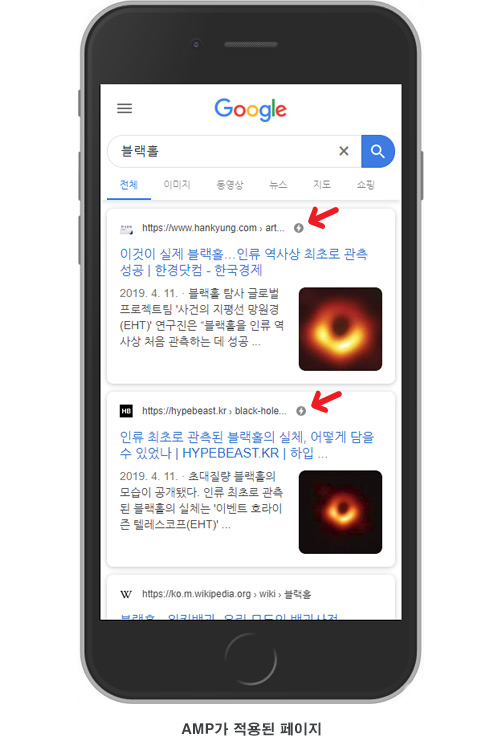
When you search Google on mobile, you will occasionally see a lightning bolt icon. It marks the page as an AMP page. Pages with this lightning icon are given priority in Google Search and shown near the top. Fast page loading helps SEO, so Google can rank these pages higher.
Drawbacks
But even AMP, which seems so good, has clear and definite drawbacks.
1. The elements you can use are limited. To speed up page loading, you have to build the site using only the elements available on amp.dev, so except for very simple sites, you may have to give up consistency with the existing desktop version. You are effectively boxed into Google’s framework. There is a lot you have to give up: classes come with !important by default, so some parts can’t be changed, and you can’t use i-amphtml tags for styling, so you have to use the default styles as they are.
2. The social networks AMP supports are Facebook, Instagram, Twitter, LinkedIn, Pinterest, Tumblr, WhatsApp, and LINE. However, the most widely used messenger in Korea is KakaoTalk, and the most used social network is BAND. To connect Korean social networks such as KakaoTalk and BAND, additional scripts and plugins end up being used unintentionally. As a result, speed drops and errors occur in the AMP Validator. That said, when users arrive via an AMP page, you can work around this to some extent by using the device sharing feature that Google provides.
3. The AMP plugin is not 100% compatible with WordPress. Very simple things are compatible to some degree, but as soon as things get a little more complex, problems appear when switching to AMP, such as one or two elements missing or layouts changing, which means extra work.
If you keep these points in mind and use AMP only where it fits, you should be able to use it without problems.
MORE AMP
Google has also released other AMP features as open source.
AMP STORY
If you use Instagram or Facebook, you’ve probably seen the Stories feature. AMP STORY immerses readers in fast-loading, full-screen experiences. You can easily create stories with fun animations and engaging interactions. The AMP STORY format is free and part of the open web, so anyone can use it on their own website.
AMP STORY helps content publishers deliver visually rich information. It also gives advertisers and publishers powerful ad opportunities to reach audiences on the web through immersive experiences.
( Reference: http://amp.dev/about/stories )
AMP Ad
AMP fundamentally changes how ads are created, delivered, and measured on the web. It speeds up how quickly users get information and minimizes the time they spend, which raises viewability and click-through rates and improves monetization, so users get the information and products they want and sellers earn revenue.
( Reference: https://amp.dev/about/ads )
AMP E-mail
AMP for email lets senders include AMP components in their emails, enabling modern app features within the email itself. The AMP E-mail format provides a subset of AMP HTML components for use in email messages, so that recipients of AMP E-mails can interact directly with the message content.
Every day, 270 billion emails are sent worldwide, but what can be delivered in an email message is limited. Messages are static, can become outdated, and can’t take action without opening a browser. AMP for email aims to improve the email experience with added support for dynamic content and interactivity while keeping users safe.
( Reference: https://amp.dev/about/email )
Wrapping up
For a polished AMP project, detailed adjustments to each element are needed even if you install the WordPress AMP Plugin. If you are considering custom AMP pages, you can’t use external scripts and must work with a limited set of elements, so there are limitations and it will take considerable effort. Even so, if you use AMP, it will be well worth the work and can help lead your project to success.
May.2019By Studio JT