What Is a Favicon? Its Role, Why It Matters, How to Make One and the Easiest Way to Set It Up in WordPress
Small icon, big impact: boost your website's presence with a memorable favicon
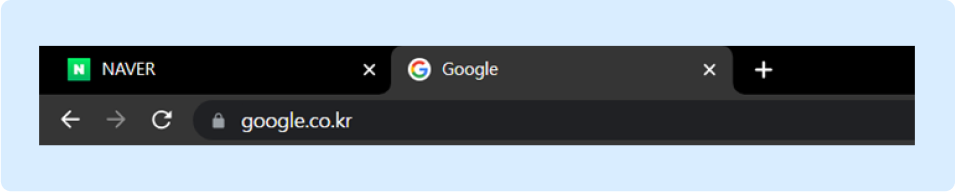
When you visit a website, there’s an icon that naturally appears in the address bar.
We call it a “favicon.”
The role and importance of favicons
“Favicon” is a blend of “favorites” and “icon”, and refers to the representative icon shown in the address bar. These days it appears not only in the address bar but also in browser history, tabs, bookmarks and many other places, making it an important element for improving a website’s recognizability and brand awareness.
- Stronger brand recognition and visibility : A favicon is an image that represents the identity of a website or app, and it strengthens brand recognition and visibility. Through the favicon, users can easily recognize a logo or icon at a glance and experience a consistent brand identity.
- Website identification and a better user experience : Favicons appear in bookmarks, tabs, the address bar and more, helping users easily identify and manage websites. This makes it easier for users to find the website they want and improves the user experience.
- Mobile compatibility : Favicons are also shown on mobile devices, which means a website can maintain consistent branding and visibility on mobile too. When a favicon appears in a mobile browser or as an app icon, users can easily add the site to their favorites or set it as a shortcut on their home screen.
- SEO impact : Favicons also play an important role from a search engine optimization (SEO) perspective. Search engines index favicons and use them as a factor in evaluating a website’s credibility and professionalism, which can help raise click-through rates on search engine results pages.
How to make a favicon
Before making a favicon, you should also consider how to represent your website so visitors can easily find their way back to it. Since it plays an important role in brand recognition even in a tiny space, it’s best to think it through carefully before creating it.
- Size and format
Because a favicon is an icon displayed in a small space, a small file size and fast loading are important. Files sized 16 x 16 (px) or 32 x 32 (px) are commonly used, but you can also use 48 x 48 (px) or 64 x 64 (px) for high-resolution displays.
The recommended formats are ico, png, jpg, jpeg and gif, which most browsers support. SVG, as a vector image, can be convenient for resizing, but browser support is limited, so use it with care. - A clear, distinctive design
Since it shows your logo or main website icon at a greatly reduced size, it should be designed to be clear and distinctive, and ideally it should preserve your brand identity well. Too much detail may not be visible in such a small icon.
Adding a favicon in WordPress
Once your favicon is ready, you can set it easily in your installed WordPress theme. If you change themes often or use a free theme, you can also set it manually by uploading it directly to the website’s root directory.
(Reference: https://wordpress.org/documentation/article/create-a-favicon/)
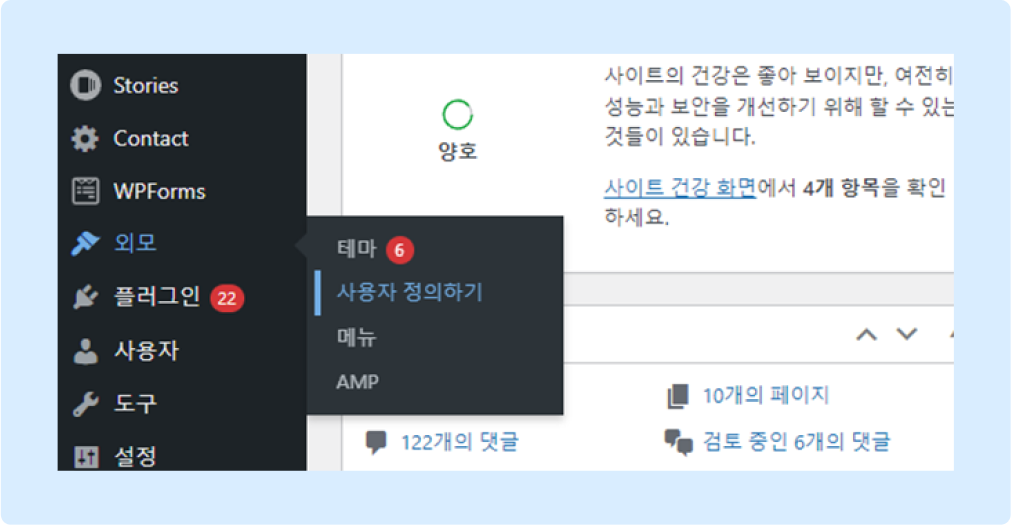
1. Click “Admin > Appearance > Customize”
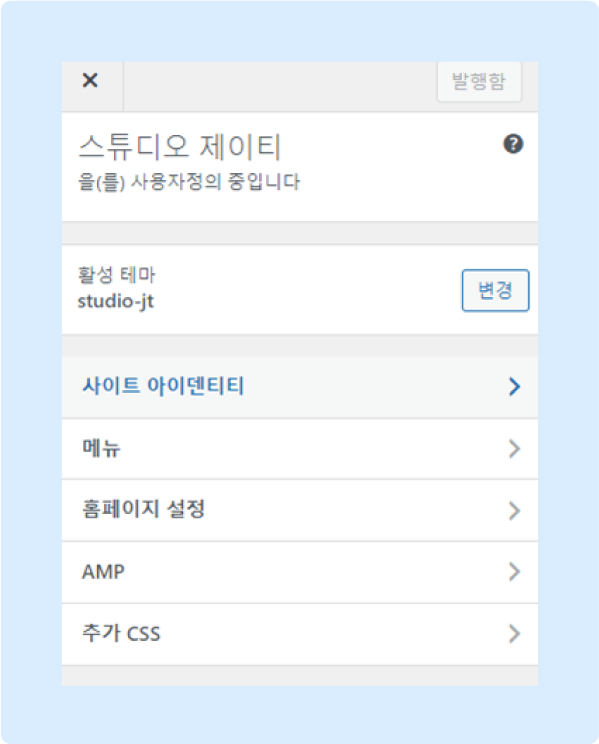
2. Click “Customize > Site Identity”
3. Click “Site Identity > Site Icon,” upload the image and publish. Done!
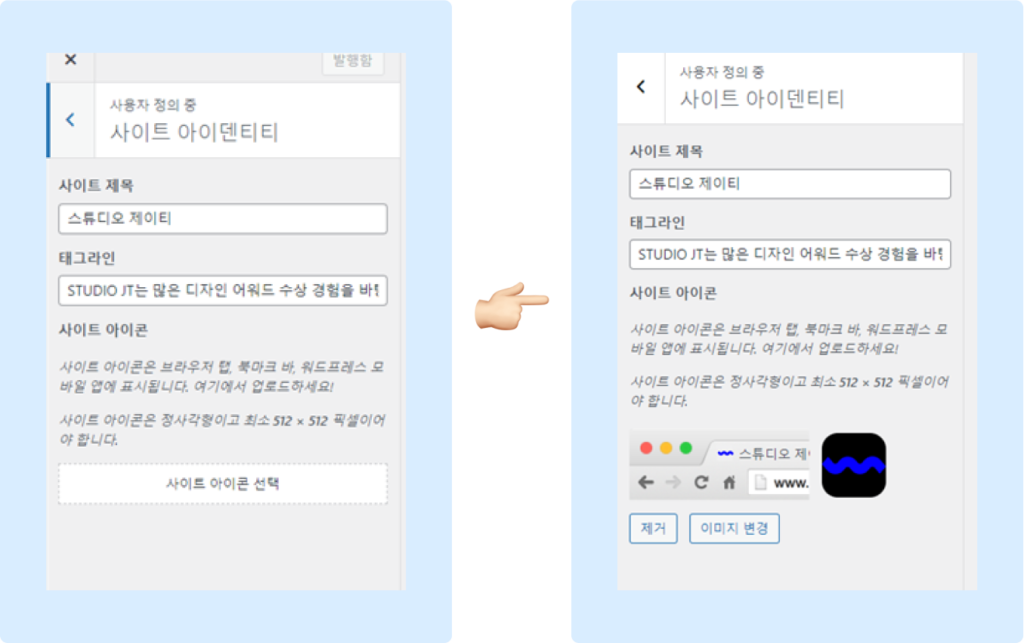
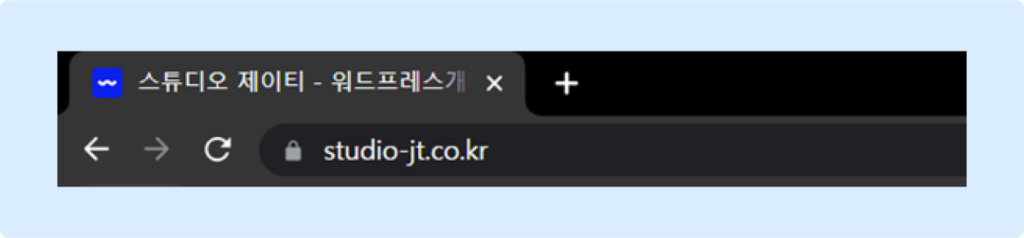
4. How it looks once applied
(If it doesn’t appear to be applied, try clearing temporary files and your browser cache, then refresh.)
Free resources and references
You can make a favicon fairly easily with graphic editing tools (Adobe Photoshop, Illustrator, Figma, etc.). If no one on your team uses these tools, free online tools make it simple, so use the sites below to create an icon that reflects your website’s main colors and theme.
- Create a favicon: https://favicon.io/favicon-generator/
- Convert a favicon: https://www.favicon.software/
To wrap up, setting a favicon is very important because it helps visitors recognize your site and continuously conveys your brand identity. Since you can add one easily through the WordPress admin without any special expertise, why not set up a favicon and make your website, or your brand’s website, stand out with its own personality?
Jun.2023By Studio JT